> ## Documentation Index
> Fetch the complete documentation index at: https://www.presolve.com/docs/llms.txt
> Use this file to discover all available pages before exploring further.
# Review a recorded disbursement
> Check the payee, source check, amount, and individual payment status.
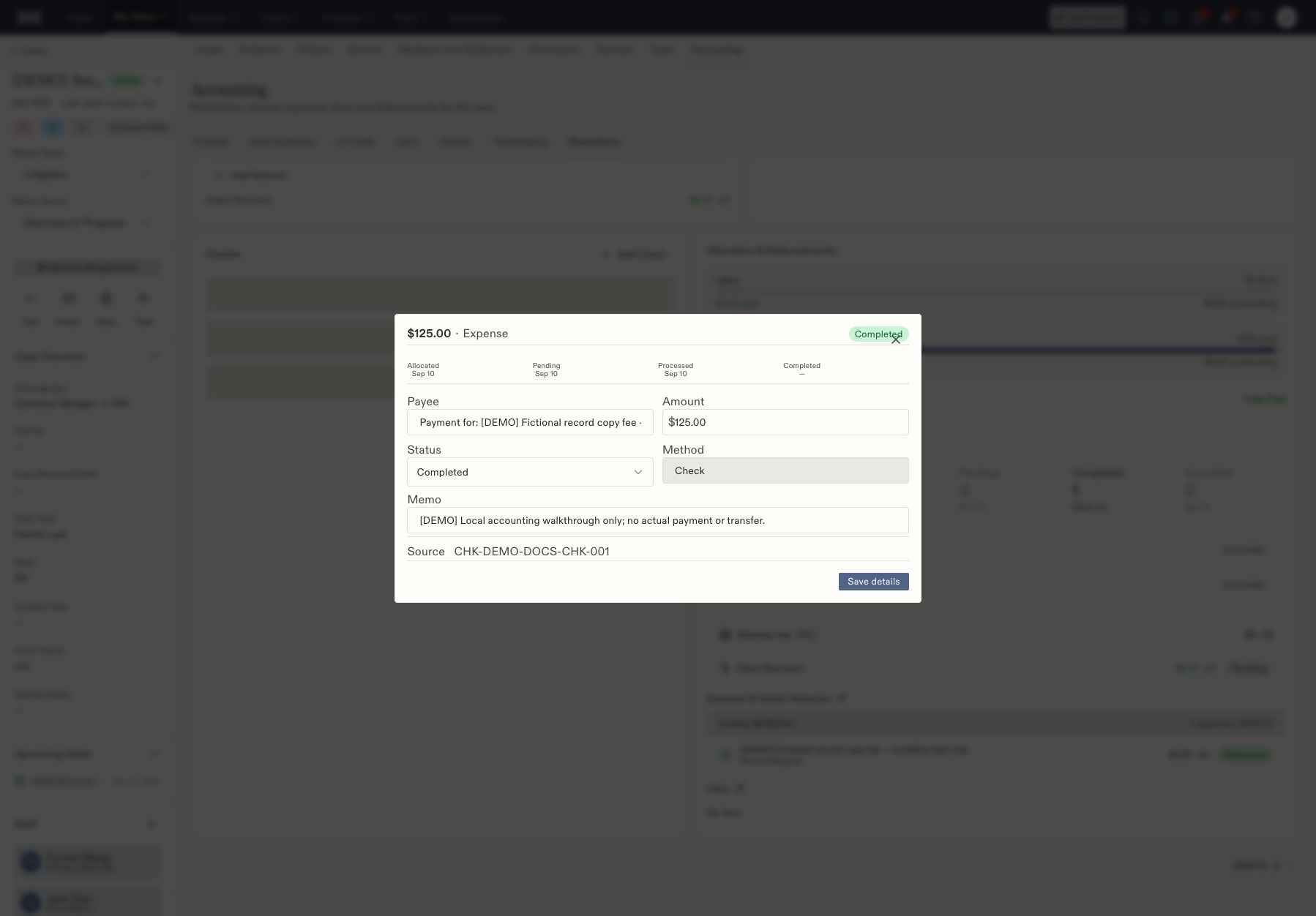
Open a matter's **Accounting → Resolutions**, select the settlement, and review its **Disbursements**. Each record identifies one destination for allocated funds.
This guide covers reviewing and updating a manual accounting record. Use your firm's evidence of payment to decide which status to record.
## Inspect the record
1. Select the disbursement by amount and type, such as Expense or Client Recovery.
2. Check **Payee**, **Amount**, **Method**, **Memo**, and **Source**.
3. Confirm that the source is the intended check and the amount matches its allocation.
4. Read the individual **Status** before reporting the payment's progress.
 ## Record progress
For a manual disbursement, the available controls depend on its current state. **Mark sent** moves an Allocated record to Pending. The status selector then offers later states such as Processed and Completed.
1. Confirm the actual payment progress using your firm's accounting records.
2. Select the corresponding available status.
3. Add or update the memo when needed.
4. Select **Save details**.
5. Reopen the disbursement and verify the saved status.
Do not advance a status merely to move work out of a queue. Recording Completed in Presolve does not itself transfer funds.
## Check every destination
One expense may be Completed while Client Recovery is still Allocated. Inspect each individual disbursement; a settlement summary does not replace this check. If you encounter an incorrect amount or destination, have the accounting owner review the source allocation before making a correction.
Start earlier in the process with [invoice review and staging](/docs/help/accounting/invoice-review).
## Record progress
For a manual disbursement, the available controls depend on its current state. **Mark sent** moves an Allocated record to Pending. The status selector then offers later states such as Processed and Completed.
1. Confirm the actual payment progress using your firm's accounting records.
2. Select the corresponding available status.
3. Add or update the memo when needed.
4. Select **Save details**.
5. Reopen the disbursement and verify the saved status.
Do not advance a status merely to move work out of a queue. Recording Completed in Presolve does not itself transfer funds.
## Check every destination
One expense may be Completed while Client Recovery is still Allocated. Inspect each individual disbursement; a settlement summary does not replace this check. If you encounter an incorrect amount or destination, have the accounting owner review the source allocation before making a correction.
Start earlier in the process with [invoice review and staging](/docs/help/accounting/invoice-review).