> ## Documentation Index
> Fetch the complete documentation index at: https://www.presolve.com/docs/llms.txt
> Use this file to discover all available pages before exploring further.
# Find the right firm setting
> Locate intake, document, notification, contact-role, and integration configuration.
Open **Settings** from your account menu. Available tabs depend on your access and organization. A reader's job function does not guarantee permission to change a firm setting.
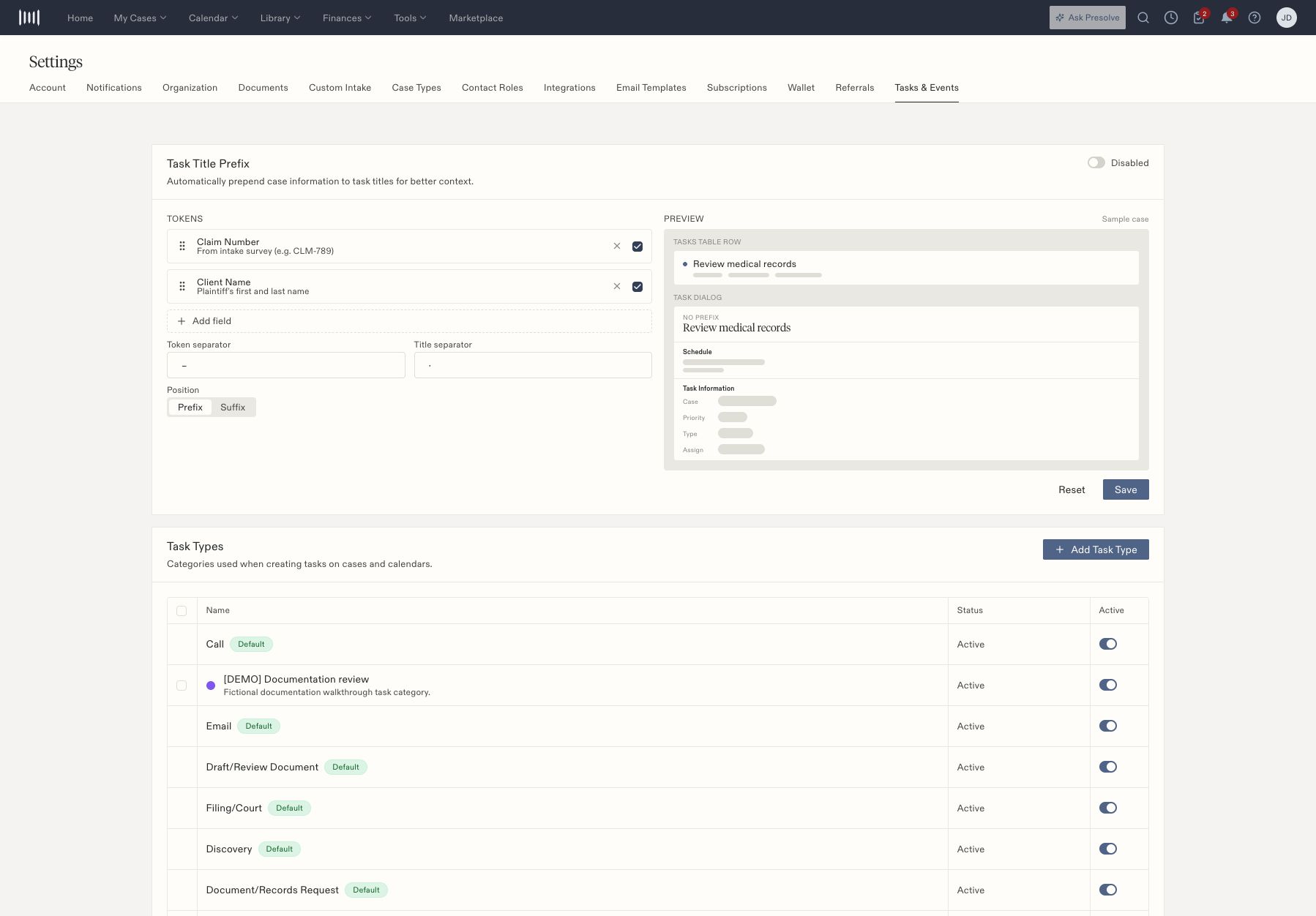 | Tab | What it contains |
| - | - |
| Account | Personal account settings and master notification switches |
| Notifications | Individual email and SMS notification preferences |
| Organization | Organization configuration, including case-tag management |
| Documents | Default folders, e-sign types, reminder and notification configuration |
| Custom Intake | Intake sets, questions, decisions, preview, and publication |
| Case Types | Case-type configuration and matter layouts |
| Contact Roles | Roles for contacts associated with cases |
| Integrations | Provider connections and developer integration entries |
| Email Templates | Reusable email content and sender settings |
| Referrals | Referral defaults and related notification settings |
| Tasks & Events | Task/event categories and task-title formatting |
## Make a deliberate change
Confirm the setting's scope before saving: personal preference, organization default, case type, or one matter. Review inheritance or override text where it appears. Test a new intake or layout on an isolated case type before assigning it broadly.
Contact roles describe a person's relationship to a case. They are separate from employee access permissions. Similarly, changing a task category does not change who can view a matter.
Start with [custom intakes](/docs/help/admin/intake-builder), [task types](/docs/help/admin/task-types), [notification preferences](/docs/help/admin/notifications), or [integrations](/docs/help/integrations/overview).
## Direct routes to settings
Use these links while signed in to the intended organization. If a tab is unavailable, ask the firm's administrator to check your access.
| Setting | Route |
| - | - |
| Account | [Account settings](https://attorney.dearlegal.com/dashboard/settings?tab=account) |
| Notifications | [Notification settings](https://attorney.dearlegal.com/dashboard/settings?tab=notifications) |
| Organization | [Organization settings](https://attorney.dearlegal.com/dashboard/settings?tab=organization) |
| Documents | [Document settings](https://attorney.dearlegal.com/dashboard/settings?tab=documents) |
| Custom Intake | [Intake settings](https://attorney.dearlegal.com/dashboard/settings?tab=intake) |
| Case Types | [Case-type settings](https://attorney.dearlegal.com/dashboard/settings?tab=case-types) |
| Contact Roles | [Contact-role settings](https://attorney.dearlegal.com/dashboard/settings?tab=contact-roles) |
| Integrations | [Integration settings](https://attorney.dearlegal.com/dashboard/settings?tab=integrations) |
| Email Templates | [Email settings](https://attorney.dearlegal.com/dashboard/settings?tab=emails) |
| Referrals | [Referral settings](https://attorney.dearlegal.com/dashboard/settings?tab=referrals) |
| Tasks & Events | [Task-type settings](https://attorney.dearlegal.com/dashboard/settings?tab=task-types) |
## Understand defaults and overrides
Document settings include default folders by case type and a fallback, custom e-sign document types, reminder controls, and signing-message settings. Where the screen distinguishes an inherited default from an organization override, check which value is effective before editing.
Contact Roles can include built-in entries that cannot be edited and roles managed by a parent organization. A custom case-contact role describes a relationship to the case; it does not grant a staff member access.
Email templates include a name, category, delivery method, sender or default mailbox, Cc, library attachment, and subject/body variables. Inspect the preview and sender settings together. The category controls where the template is offered in send dialogs, and shared templates resolve the sending attorney's mailbox according to the screen's explanation.
Notification preferences have two levels: Account master switches and individual category settings. Review both when changing email or SMS preferences. See [notification controls](/docs/help/admin/notifications).
Related guides: [access roles](/docs/help/admin/roles), [case-contact roles](/docs/help/admin/contact-roles), [tag automation](/docs/help/admin/tag-automation), [document defaults](/docs/help/admin/document-defaults), [email templates](/docs/help/admin/email-templates), and [deadline settings](/docs/help/admin/deadlines).
| Tab | What it contains |
| - | - |
| Account | Personal account settings and master notification switches |
| Notifications | Individual email and SMS notification preferences |
| Organization | Organization configuration, including case-tag management |
| Documents | Default folders, e-sign types, reminder and notification configuration |
| Custom Intake | Intake sets, questions, decisions, preview, and publication |
| Case Types | Case-type configuration and matter layouts |
| Contact Roles | Roles for contacts associated with cases |
| Integrations | Provider connections and developer integration entries |
| Email Templates | Reusable email content and sender settings |
| Referrals | Referral defaults and related notification settings |
| Tasks & Events | Task/event categories and task-title formatting |
## Make a deliberate change
Confirm the setting's scope before saving: personal preference, organization default, case type, or one matter. Review inheritance or override text where it appears. Test a new intake or layout on an isolated case type before assigning it broadly.
Contact roles describe a person's relationship to a case. They are separate from employee access permissions. Similarly, changing a task category does not change who can view a matter.
Start with [custom intakes](/docs/help/admin/intake-builder), [task types](/docs/help/admin/task-types), [notification preferences](/docs/help/admin/notifications), or [integrations](/docs/help/integrations/overview).
## Direct routes to settings
Use these links while signed in to the intended organization. If a tab is unavailable, ask the firm's administrator to check your access.
| Setting | Route |
| - | - |
| Account | [Account settings](https://attorney.dearlegal.com/dashboard/settings?tab=account) |
| Notifications | [Notification settings](https://attorney.dearlegal.com/dashboard/settings?tab=notifications) |
| Organization | [Organization settings](https://attorney.dearlegal.com/dashboard/settings?tab=organization) |
| Documents | [Document settings](https://attorney.dearlegal.com/dashboard/settings?tab=documents) |
| Custom Intake | [Intake settings](https://attorney.dearlegal.com/dashboard/settings?tab=intake) |
| Case Types | [Case-type settings](https://attorney.dearlegal.com/dashboard/settings?tab=case-types) |
| Contact Roles | [Contact-role settings](https://attorney.dearlegal.com/dashboard/settings?tab=contact-roles) |
| Integrations | [Integration settings](https://attorney.dearlegal.com/dashboard/settings?tab=integrations) |
| Email Templates | [Email settings](https://attorney.dearlegal.com/dashboard/settings?tab=emails) |
| Referrals | [Referral settings](https://attorney.dearlegal.com/dashboard/settings?tab=referrals) |
| Tasks & Events | [Task-type settings](https://attorney.dearlegal.com/dashboard/settings?tab=task-types) |
## Understand defaults and overrides
Document settings include default folders by case type and a fallback, custom e-sign document types, reminder controls, and signing-message settings. Where the screen distinguishes an inherited default from an organization override, check which value is effective before editing.
Contact Roles can include built-in entries that cannot be edited and roles managed by a parent organization. A custom case-contact role describes a relationship to the case; it does not grant a staff member access.
Email templates include a name, category, delivery method, sender or default mailbox, Cc, library attachment, and subject/body variables. Inspect the preview and sender settings together. The category controls where the template is offered in send dialogs, and shared templates resolve the sending attorney's mailbox according to the screen's explanation.
Notification preferences have two levels: Account master switches and individual category settings. Review both when changing email or SMS preferences. See [notification controls](/docs/help/admin/notifications).
Related guides: [access roles](/docs/help/admin/roles), [case-contact roles](/docs/help/admin/contact-roles), [tag automation](/docs/help/admin/tag-automation), [document defaults](/docs/help/admin/document-defaults), [email templates](/docs/help/admin/email-templates), and [deadline settings](/docs/help/admin/deadlines).