> ## Documentation Index
> Fetch the complete documentation index at: https://www.presolve.com/docs/llms.txt
> Use this file to discover all available pages before exploring further.
# Configure task and event categories
> Add a task category and make it available to staff.
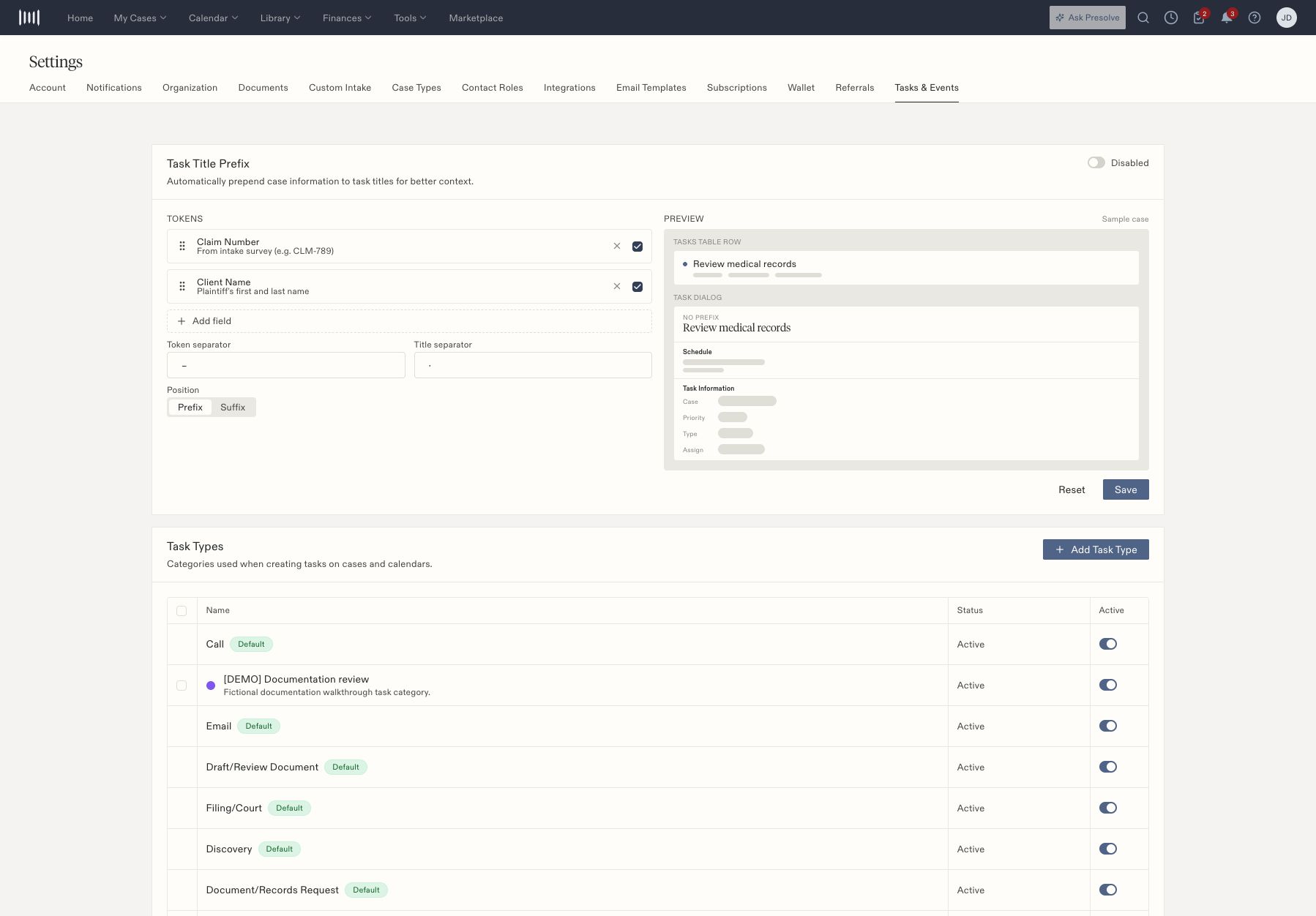
Open [Settings → Tasks & Events](https://attorney.dearlegal.com/dashboard/settings?tab=task-types). Task types categorize work; event types categorize calendar entries. They do not grant staff permissions.
## Add a task type
1. Under **Task Types**, select **Add Task Type**.
2. Enter the required name and an optional description.
3. Choose an icon and color that help staff recognize the category.
4. Save and confirm the new row is **Active**.
5. Open [Create Task](/docs/help/tasks/create-and-track) and verify the type appears in the picker.
 ## Review active categories
Use the **Active** switch on a category to deactivate or reactivate it. Reopen the settings page to confirm the saved state. Confirm the category is available when creating a task.
Built-in categories are marked **Default** and cannot be selected for bulk operations. Review the available controls on each row rather than treating a built-in category like a new custom one.
## Other controls on this page
**Event Types** is the corresponding category list for calendar events. **Task Title Prefix** configures the case information displayed with task titles. It provides ordered fields, separators, Prefix/Suffix placement, a preview, Reset, and Save. Review the preview with your firm's naming convention before changing it.
Related: [Task statuses](/docs/help/tasks/statuses) and [schedule an event](/docs/help/tasks/calendar).
## Review active categories
Use the **Active** switch on a category to deactivate or reactivate it. Reopen the settings page to confirm the saved state. Confirm the category is available when creating a task.
Built-in categories are marked **Default** and cannot be selected for bulk operations. Review the available controls on each row rather than treating a built-in category like a new custom one.
## Other controls on this page
**Event Types** is the corresponding category list for calendar events. **Task Title Prefix** configures the case information displayed with task titles. It provides ordered fields, separators, Prefix/Suffix placement, a preview, Reset, and Save. Review the preview with your firm's naming convention before changing it.
Related: [Task statuses](/docs/help/tasks/statuses) and [schedule an event](/docs/help/tasks/calendar).