> ## Documentation Index
> Fetch the complete documentation index at: https://www.presolve.com/docs/llms.txt
> Use this file to discover all available pages before exploring further.
# Review RingCX lead and call settings
> Understand account, import, routing, and recording controls.
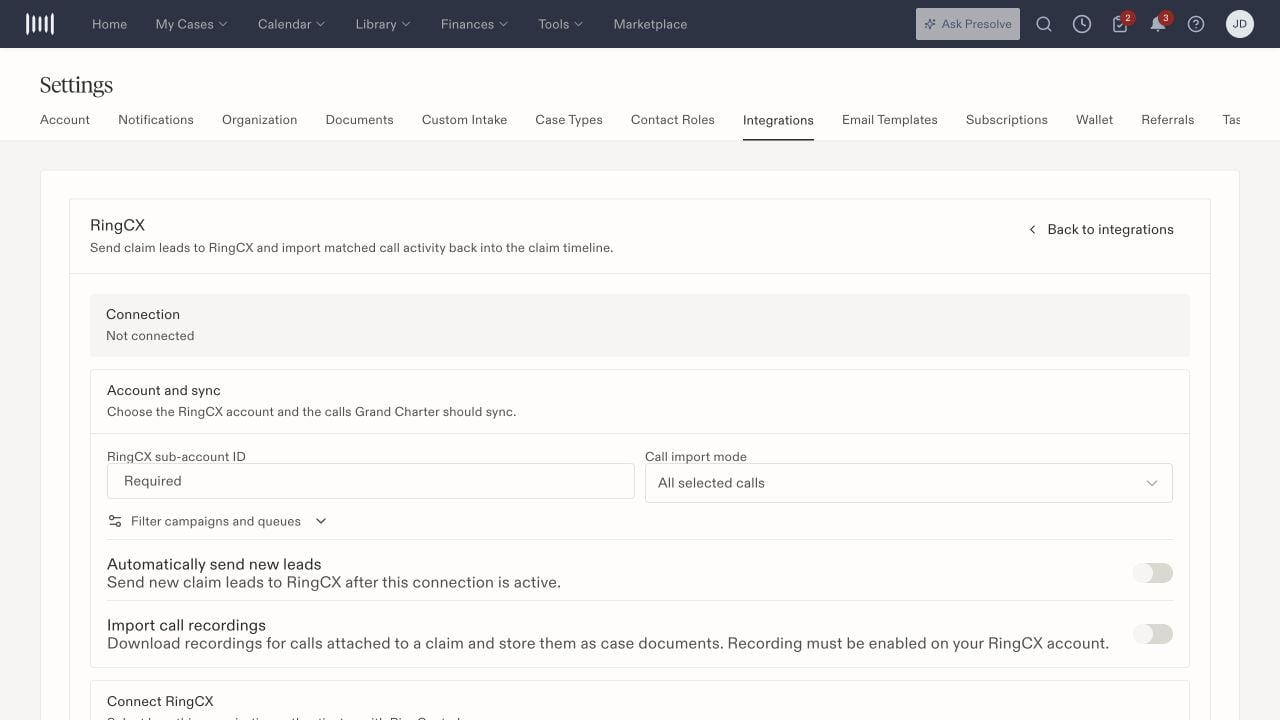
Open **RingCX** in [Settings → Integrations](https://attorney.dearlegal.com/dashboard/settings?tab=integrations). Coordinate configuration with the person who manages your firm's call system and intake routing.
## Review the configuration
| Control | What to confirm |
| - | - |
| Sub-account | The intended provider account for this organization's activity. |
| Import mode | The activity your firm intends to import. |
| Campaign/queue filters | Which campaigns or queues should be included. |
| Automatic lead sending | Whether new leads should be routed automatically under the firm's process. |
| Recordings | The intended recording configuration and the records staff should expect. |
| JWT setup | The authentication information requested by the configured connection method. |
Connection methods can vary by environment. If OAuth is unavailable, review the authentication method offered on your setup screen with the integration owner.
## Distinguish saving from sending a lead
Case intake can offer **Save** and **Save & Send to RingCentral**. A matter can also expose **Send to RingCentral**. Review the intended destination and automatic-sending configuration before using a send action.
Saving an intake, routing a lead, and importing a later call are separate results. Check the relevant case and provider activity when verifying each step.
## Review imported activity
Open **Records → Calls** on the intended matter. Check the call participants, time, and available recording details. If an expected call is missing, inspect filters and give the integration owner a specific example, including campaign or queue context when known.
After configuration, verify the intended lead-routing and call-import results separately. A setup change alone does not confirm either outcome.
 Related: [Integration overview](/docs/help/integrations/overview).