> ## Documentation Index
> Fetch the complete documentation index at: https://www.presolve.com/docs/llms.txt
> Use this file to discover all available pages before exploring further.
# Find your way around Presolve
> Locate matters, documents, calendars, accounting, and your firm tools.
Start from [Presolve](https://attorney.dearlegal.com/dashboard). The navigation across the top gives you access to firm-wide work; opening a case takes you into that matter's workspace.
| Area | Use it for |
| - | - |
| My Cases | Find and open cases |
| Calendar | Open calendar and task views |
| Library | Browse and organize firm documents |
| Tools | Open reporting and automation tools |
| Ask Presolve | Start or return to an assistant conversation |
| Approvals | Review work that needs an assigned reviewer's decision |
| Notifications | Check in-app updates |
| Your initials or avatar | Open account and settings options |
## Choose a case view
In **My Cases**, use **Pending Leads**, **Active Cases**, **Closed Cases**, or **Referrals**. Pending Leads includes New Leads, Under Review, and Converted; Active Cases includes Pre Suit, Litigation, and Settlement Pending.
A signed client can appear in Converted and Active or Closed at the same time. These are views of the same record. See [the lead and matter lifecycle](/docs/help/leads/lifecycle) for source visibility, signing, closure, and referral rules.
## Move around a matter
1. Open **My Cases** and select the matter you need.
2. Check the case name and number before making changes.
3. Use the matter's tabs or side navigation to select an area. The layout depends on the case type and your firm's configuration.
4. In a workspace with **Case Assets**, expand it to find shared areas such as Documents, Records, Tasks, Calendar, and Accounting.
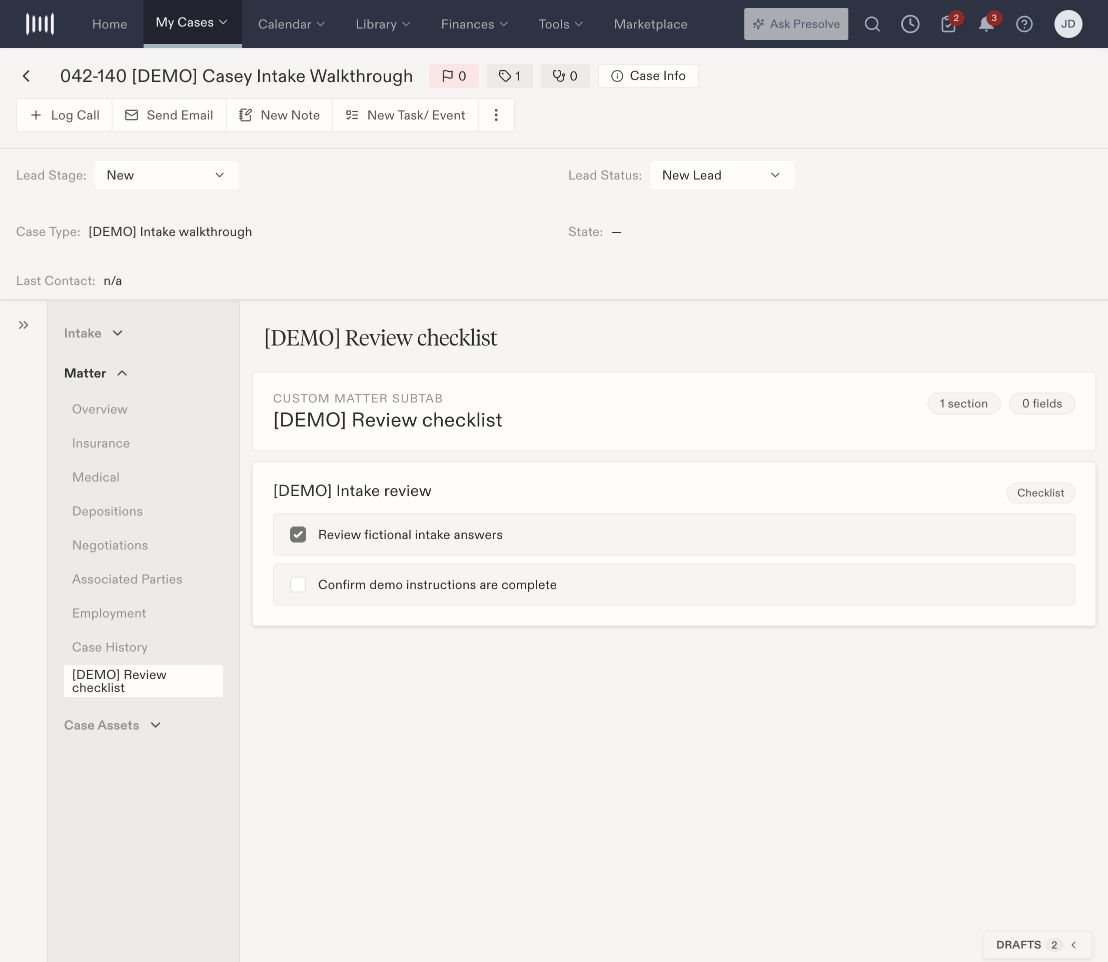 Practice workspaces can have different stages and tabs. A family-law matter, for example, may show Evidence, Petition, Service, and Mediation and Settlement across the top. Use the labels present on your matter.
## When something is missing
Check the current case, selected view, and filters first. If you still cannot find the page or record, ask your firm administrator about your case assignment and available features.
Next: [Create a matter document](/docs/help/documents/create-document), [use case tags](/docs/help/matters/tags), or [complete a custom checklist](/docs/help/matters/checklists).
Practice workspaces can have different stages and tabs. A family-law matter, for example, may show Evidence, Petition, Service, and Mediation and Settlement across the top. Use the labels present on your matter.
## When something is missing
Check the current case, selected view, and filters first. If you still cannot find the page or record, ask your firm administrator about your case assignment and available features.
Next: [Create a matter document](/docs/help/documents/create-document), [use case tags](/docs/help/matters/tags), or [complete a custom checklist](/docs/help/matters/checklists).