> ## Documentation Index
> Fetch the complete documentation index at: https://www.presolve.com/docs/llms.txt
> Use this file to discover all available pages before exploring further.
# Work through a lemon-law matter
> Locate screening, engagement, litigation, settlement, and closeout records.
Open the matter from [My Cases](https://attorney.dearlegal.com/dashboard/cases), confirm its case type, and select **Lemon Law**. This workspace organizes the matter into phases while keeping Documents, Records, eSign, Tasks, Events, and Accounting available in separate tabs.
## Navigate the phases
The phase shortcuts take you to the corresponding section. Expand a phase to inspect its fields and recorded progress. Use the applicable sections for your matter and follow the responsible attorney's instructions for substantive decisions.
| Shortcut | Records to review |
| - | - |
| Screening | Vehicle identification, purchase/use, dealer and lienholder, warranty, repair history, and qualification information |
| Engagement | Retainer, authorizations, chronology, onboarding, and document collection |
| Pre-lit | Notice information, supporting email/documents, demand preparation, responses, and notes |
| Track & forum | Recorded forum and claim choices, parties, service sequence, and supporting memoranda |
| Pleading | Filing dates, court and case number, pleading packet, service, and responses |
| Discovery | Disclosures, discovery dates, mediation, motions, and expert tracking |
| Settlement | Resolution and dismissal details, releases, consent, deadlines, and completion logistics |
| Trial | Trial preparation, dates, outcome, and notes |
| Fees & closeout | Fee and cost records, satisfaction, trust/closing checks, and recovery summary |
A phase's label, checklist, or progress count helps organize work. It does not establish that a filing, notice, payment, or other external act occurred.
## Review intake and screening
The **Client Intake Questionnaire** entry shows an answer count and submission state, with controls to expand or edit the questionnaire. Review the recorded answers and submission state separately: an answer count does not establish that the client submitted the questionnaire.
Screening includes vehicle and repair information. The workspace also offers vehicle/recall-related controls. Check source records and the resulting information when using those tools; the presence of a lookup button does not establish that a lookup has run.
## Track engagement and document collection
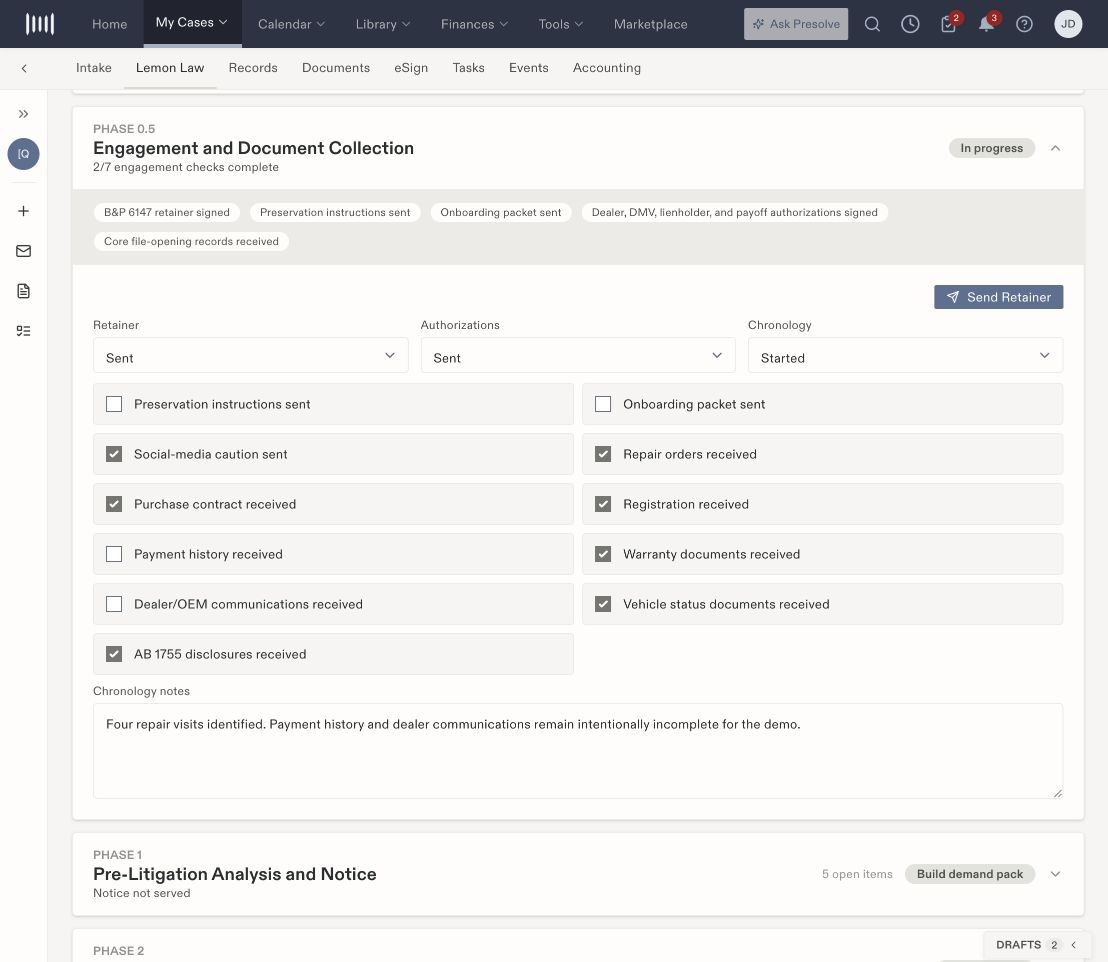 Use the [engagement checklist guide](/docs/help/practices/lemon-engagement) to review these controls. Store the supporting files in Documents and inspect the actual e-sign record when checking signature completion.
## Record later phase work
Before entering a date, confirm what event the field describes: filing, service, response, settlement, or another milestone. Compare it with the supporting record. The workspace's deadline watchlist describes clocks based on trigger dates; review the resulting deadlines under your firm's process rather than assuming an empty watchlist means no deadline exists.
Where the workspace displays routing or playbook suggestions, compare them with the matter's saved choices and the responsible attorney's instructions. Suggestions and saved values can differ. This guide explains where information is recorded; it does not prescribe a litigation strategy or validate legal deadlines.
After an authorized edit, use **Save** when enabled, wait for the result, and reopen the section to verify the retained values. Keep the actual document, communication, task, or accounting record connected to the update.
## Complete the file review
Settlement and closeout sections are distinct from payment execution. Compare the recorded resolution with [checks and disbursements](/docs/help/accounting/disbursements), remaining tasks, and the closing documents. Review the overall [matter stage](/docs/help/leads/lifecycle) separately from a phase checklist.
Use the [engagement checklist guide](/docs/help/practices/lemon-engagement) to review these controls. Store the supporting files in Documents and inspect the actual e-sign record when checking signature completion.
## Record later phase work
Before entering a date, confirm what event the field describes: filing, service, response, settlement, or another milestone. Compare it with the supporting record. The workspace's deadline watchlist describes clocks based on trigger dates; review the resulting deadlines under your firm's process rather than assuming an empty watchlist means no deadline exists.
Where the workspace displays routing or playbook suggestions, compare them with the matter's saved choices and the responsible attorney's instructions. Suggestions and saved values can differ. This guide explains where information is recorded; it does not prescribe a litigation strategy or validate legal deadlines.
After an authorized edit, use **Save** when enabled, wait for the result, and reopen the section to verify the retained values. Keep the actual document, communication, task, or accounting record connected to the update.
## Complete the file review
Settlement and closeout sections are distinct from payment execution. Compare the recorded resolution with [checks and disbursements](/docs/help/accounting/disbursements), remaining tasks, and the closing documents. Review the overall [matter stage](/docs/help/leads/lifecycle) separately from a phase checklist.