> ## Documentation Index
> Fetch the complete documentation index at: https://www.presolve.com/docs/llms.txt
> Use this file to discover all available pages before exploring further.
# Include related records in a report
> Understand case and people relationships before interpreting row counts.
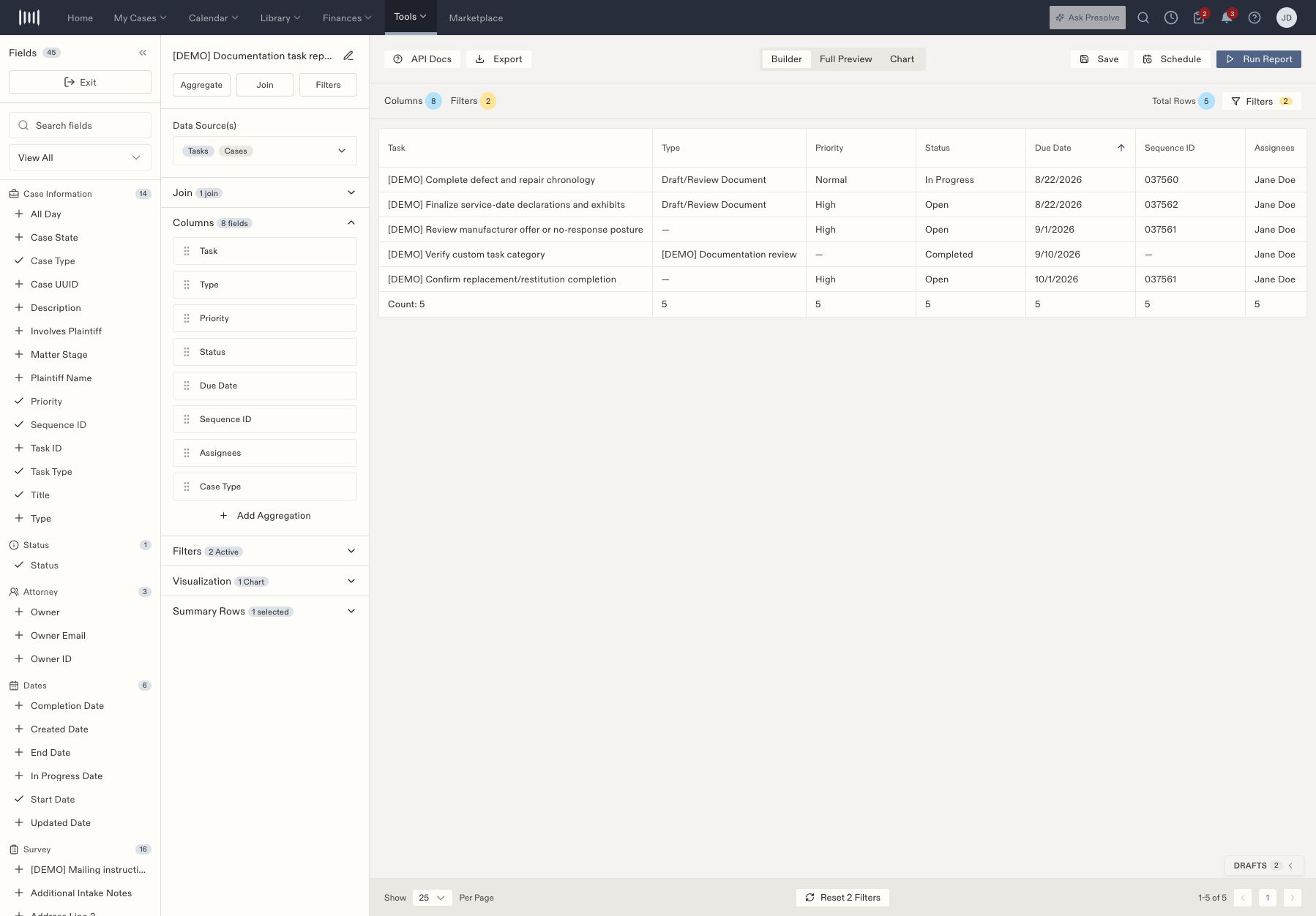
Open a saved report from [Reporting](https://attorney.dearlegal.com/dashboard/reports), then inspect **Join**. A join adds information from records related to the report's main source. For example, a task report can include the linked case's type.
## Add case fields to a task report
1. Open **Join** and select **Cases**.
2. Return to the Fields panel and find the newly available case fields.
3. Add the fields needed for the question, such as **Case Type**.
4. Run the report and compare the results with representative tasks.
5. Save and reopen the configuration.
 ## Review relationship options
For the Tasks source, the Join panel offers **Cases**, **Assignees**, and **Followers**, with **LEFT** and **INNER** choices. The people relationships also offer **One row per record** and **Aggregate** strategies.
| Choice | What to consider when checking the output |
| - | - |
| LEFT | Intended to retain main records even when related information is absent; inspect a task without a case or related person. |
| INNER | Intended to require a matching related record; check which tasks no longer appear. |
| One row per record | Multiple related people can affect the number of output rows. Compare the task identifiers before interpreting the count. |
| Aggregate | Review how the related people are combined in the result before using the output. |
Available fields depend on the source and selected relationship. If a field is missing, inspect the join before switching to a different report template.
## Verify totals after changing a join
A row count is meaningful only when you know what one row represents. After adding a people relationship, compare a task with several participants against one with a single participant. Recheck charts and summaries if the output structure changes.
Continue with [filters](/docs/help/reporting/filters) and [charts and summaries](/docs/help/reporting/charts).
## Review relationship options
For the Tasks source, the Join panel offers **Cases**, **Assignees**, and **Followers**, with **LEFT** and **INNER** choices. The people relationships also offer **One row per record** and **Aggregate** strategies.
| Choice | What to consider when checking the output |
| - | - |
| LEFT | Intended to retain main records even when related information is absent; inspect a task without a case or related person. |
| INNER | Intended to require a matching related record; check which tasks no longer appear. |
| One row per record | Multiple related people can affect the number of output rows. Compare the task identifiers before interpreting the count. |
| Aggregate | Review how the related people are combined in the result before using the output. |
Available fields depend on the source and selected relationship. If a field is missing, inspect the join before switching to a different report template.
## Verify totals after changing a join
A row count is meaningful only when you know what one row represents. After adding a people relationship, compare a task with several participants against one with a single participant. Recheck charts and summaries if the output structure changes.
Continue with [filters](/docs/help/reporting/filters) and [charts and summaries](/docs/help/reporting/charts).