> ## Documentation Index
> Fetch the complete documentation index at: https://www.presolve.com/docs/llms.txt
> Use this file to discover all available pages before exploring further.
# Complete, reopen, or cancel a task
> Record the state of the work and find it in the corresponding task view.
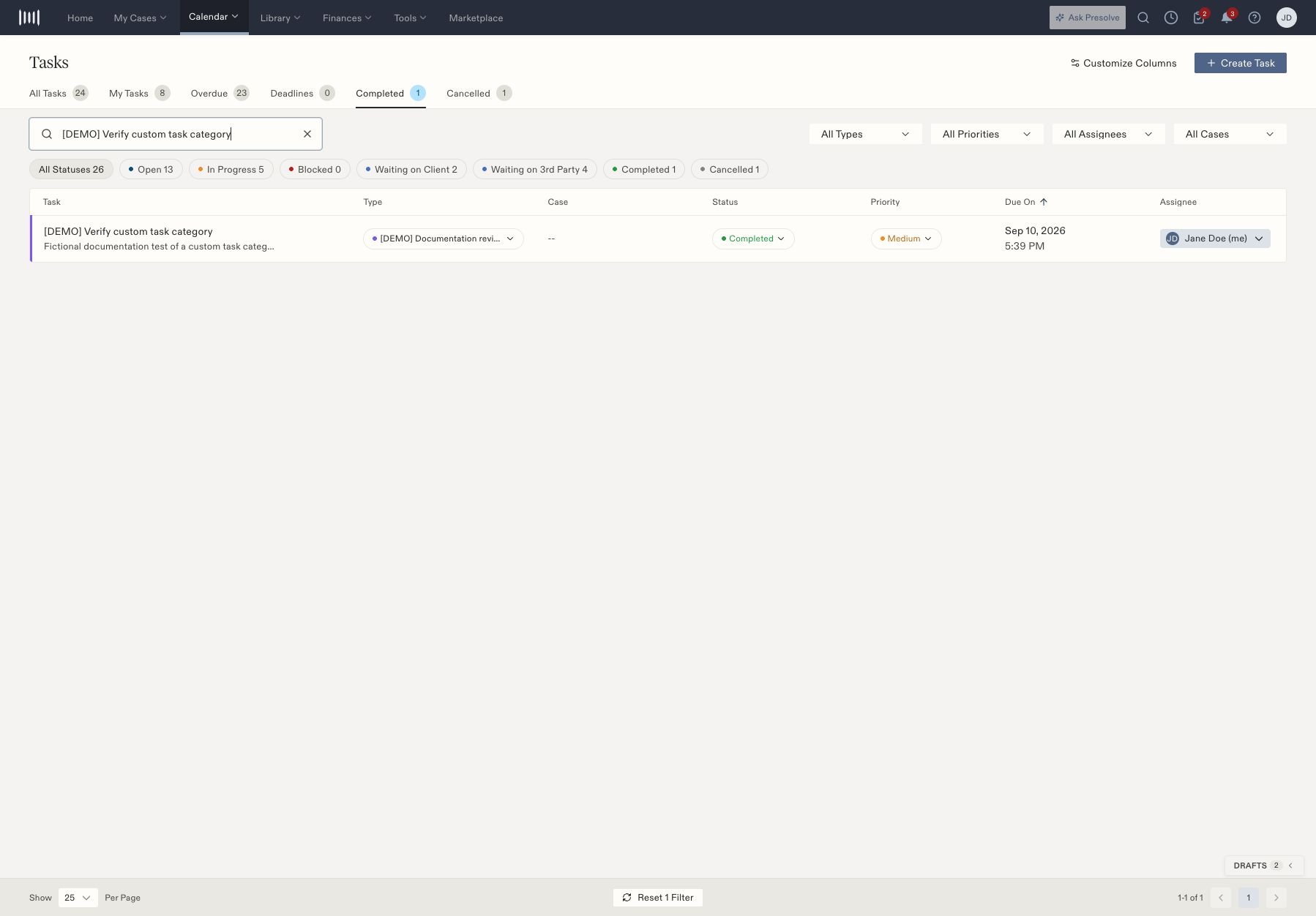
Start in [Tasks](https://attorney.dearlegal.com/dashboard/tasks). Check the task's title, case, and assignee before updating its status.
## Complete finished work
1. Find the task using the view and filters.
2. Open the row's **Status** menu and select **Completed**.
3. Select the **Completed** view and locate the task again.
4. Confirm its status and description match the work you finished.
 ## Reopen or cancel
To reopen, find the task in **Completed**, open its status menu, and choose **Open**. It returns to the active task list. Check its assignee and due date before resuming work.
To cancel work that should no longer proceed, find the task and choose **Cancelled**. Use the **Cancelled** view to locate the retained record afterward.
| Status | How to read it |
| - | - |
| Open | Work remains to be started or resumed |
| In Progress | Work is underway |
| Blocked | An obstacle prevents progress |
| Waiting on Client | The task is waiting for the client |
| Waiting on 3rd Party | The task is waiting for another party |
| Completed | The task has been marked finished |
| Cancelled | The task has been marked cancelled |
These are task records. Complete any required filing, communication, or other external work before marking the corresponding task finished. Related: [Create and assign a task](/docs/help/tasks/create-and-track).
## Reopen or cancel
To reopen, find the task in **Completed**, open its status menu, and choose **Open**. It returns to the active task list. Check its assignee and due date before resuming work.
To cancel work that should no longer proceed, find the task and choose **Cancelled**. Use the **Cancelled** view to locate the retained record afterward.
| Status | How to read it |
| - | - |
| Open | Work remains to be started or resumed |
| In Progress | Work is underway |
| Blocked | An obstacle prevents progress |
| Waiting on Client | The task is waiting for the client |
| Waiting on 3rd Party | The task is waiting for another party |
| Completed | The task has been marked finished |
| Cancelled | The task has been marked cancelled |
These are task records. Complete any required filing, communication, or other external work before marking the corresponding task finished. Related: [Create and assign a task](/docs/help/tasks/create-and-track).