

Prepare the access request
Tell the integration owner which records the external system needs and whether it only reads information or also changes it. Include the expected duration and who will own the integration.Review the creation form
Have the owner choose the access needed for the task. Use the scope reference, authentication guide, and webhook overview for technical details.
Manage an existing key
Key management requires Manage Integrations. Review the key’s issuing organization, name, prefix, expiry, scopes, acting attorney, and last-used time before editing it. Use Configure to update its settings without changing the secret. Use Revoke when the integration should no longer authenticate with that key. The secret is shown once at creation. If it is lost or needs replacement, create a new key, test and switch the integration to it, then revoke the old one. Give each integration a recognizable name and an owner responsible for expiry and access reviews.Set up HQ reporting
Use a key issued by HQ and an existing active HQ member as its acting attorney. Leave Current organization + child organizations on for report rollups. The member needs reporting, export, HQ visibility, and the appropriate case/accounting permissions. NSA data has its own access requirement. The member does not need a new account in each child organization for this authorized reporting path. The toggle affects saved report API execution. It does not change access in the Accounting or Lead Overview pages, and it does not make other API endpoints multi-organization. Report publication, application sharing, and saved filters remain separate checks. See HQ and acting-attorney permissions for the access checklist and report troubleshooting for missing records or reports.Keep access and outcomes separate
A configured credential does not establish that an external system successfully read or updated a record. The integration owner should verify the intended operation and resulting record separately. This guide covers the access-request and setup controls. Use the linked technical documentation and the integration owner’s process for credential handling and lifecycle management.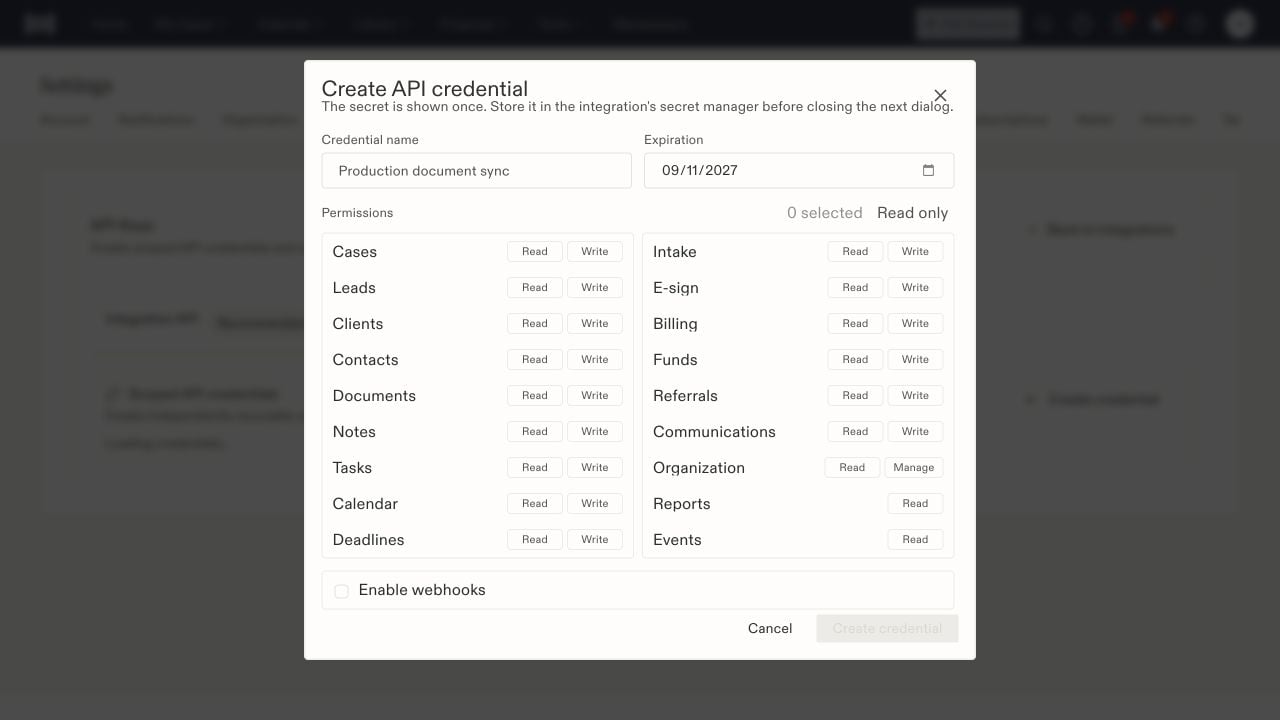
The credential form separates name, expiry, resource permissions, and optional webhooks.