Open the NSA matter and select Negotiations. Confirm the dispute and service-line context before adding or changing an offer.

Check existing offers first

Review the history for the same party, date, type, and amount. An existing entry can expose Edit offer and Delete offer; inspect the correct entry before using either control. Recording the same offer twice can make the history harder to interpret.

Complete the offer form

Select Add offer, then review each field rather than accepting defaults without checking them.
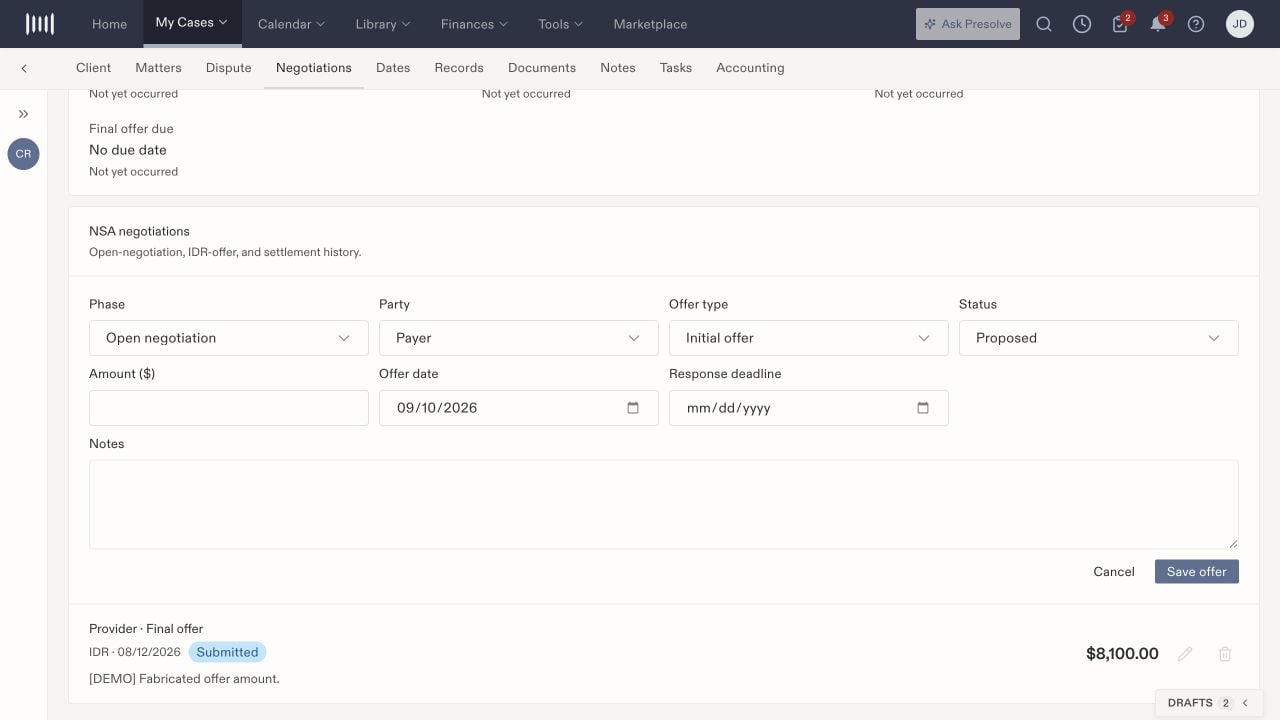
NSA Add offer form with Phase, Party, Offer type, Status, Amount, Offer date, Response deadline, and Notes.

The offer form separates phase, party, type, and status from the amount and dates.

The form can begin with Open negotiation, Payer, Initial offer, and Proposed selected. Review these values for the offer you are recording.

Save and verify

Select Save offer, wait for the result, and check the history entry. Reopen the matter if needed and compare the saved phase, party, type, status, amount, and dates with the supporting communication. Use Cancel to leave the form without saving. A locally recorded status such as Submitted does not establish that Presolve transmitted the offer to the other party or an external dispute system. Verify that external act in the corresponding source record.

Correct an entry

Use Edit offer for a correction to the intended entry, then recheck the saved history. Before deleting an entry, follow your firm’s recordkeeping process and confirm that it is the correct record. Do not use deletion as a substitute for recording a changed negotiation position. Related: NSA workspace, case activity, and task follow-up.