

Understand the workspace
Verify the provider identity
Client distinguishes the bound practice contact from descriptive provider-client details. The practice’s name, address, phone, and selected identifier come from the contact record. Use Change practice contact only when the binding itself needs correction. The Provider roster offers Add from contacts and shows the member’s contact status and identifier information. When the screen reports no active NPI, an authorized contact editor must update the contact record before that identifier can be selected. A roster description is not a substitute for the contact’s identifier. The Point of contact identifies the person used for matter updates and firm communication. Review that person separately from the rendering provider.Review the dispute and service lines
Matters and Dispute show related claim, payer, facility, and service-line information. Compare dates of service, codes, amounts, and identifiers with the supporting records. The service-line interface displays a limit of ten lines; follow the form’s validation for the record you are editing. A review-stage matter may expose Approve as case or Reject. An accepted matter can instead show a current stage and next-stage selector. Review the intended action and consequences before committing it. A stage labeled IDR Filed is not, by itself, proof of external filing or service.Review negotiations
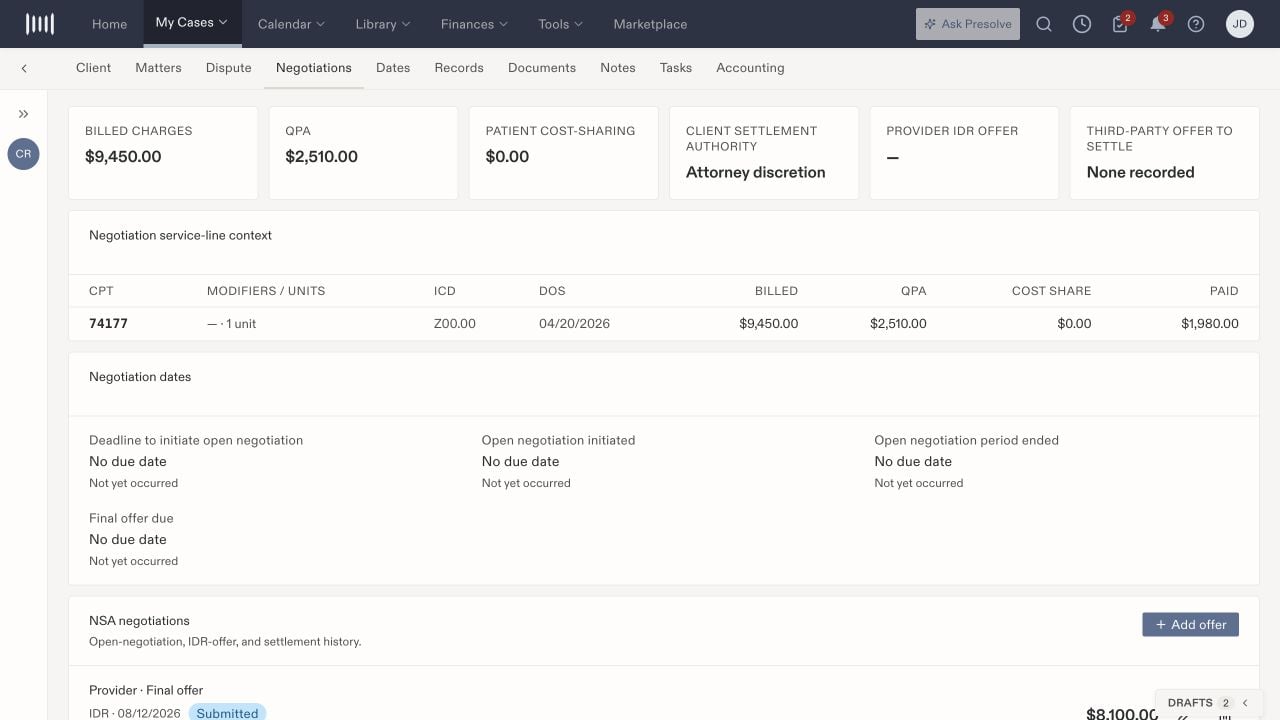
Negotiations places financial and service-line context above the offer history.