

Download the current result
Select Export in the report builder. Wait for the export result, then open the downloaded file and check its headings, row count, dates, and amounts before sharing it. A download confirmation does not replace checking the file itself. Full Preview lets you inspect the table before exporting. Chart Download PNG controls are separate from exporting the underlying data. For a chart’s setup, see charts and summaries.Schedule email delivery
- Save the report configuration you intend to distribute.
- Select Schedule.
- Review Status and Format. CSV is the initial format shown.
- Enter an intended recipient and select Add. Check the complete recipient list.
- Choose Daily, Weekly, or Monthly frequency and the corresponding day/time options.
- Check the timezone shown in the dialog. Use that timezone when interpreting the selected time.
- Select Create Schedule only when automatic delivery to those recipients is intended.
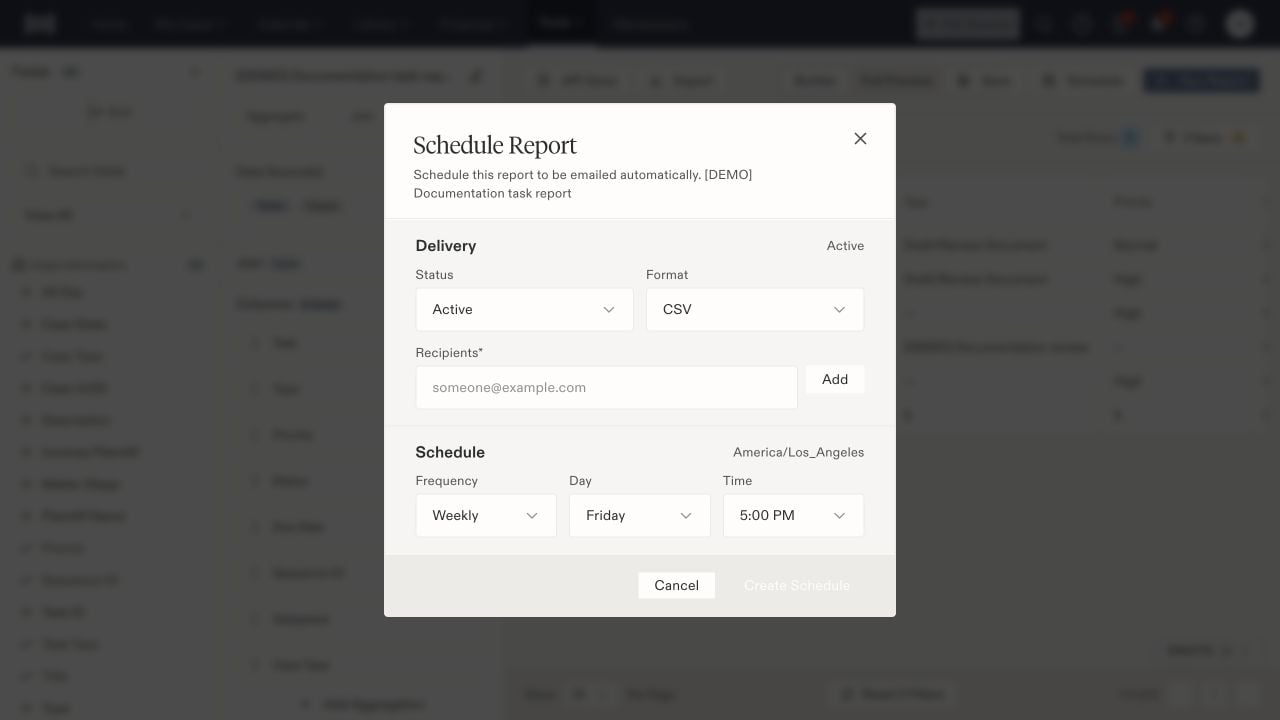
Scheduled reports have their own delivery status, recipients, frequency, and timezone.