Open Tools → Reporting → Portfolio Report. This report groups open matters by case type and displays counts and projected fees.

Choose the reporting date

Use Portfolio as of to choose Now · Live portfolio or an available saved snapshot. Live data reflects the current open-matter records. Check the capture time and organization scope shown above the table when interpreting the result.
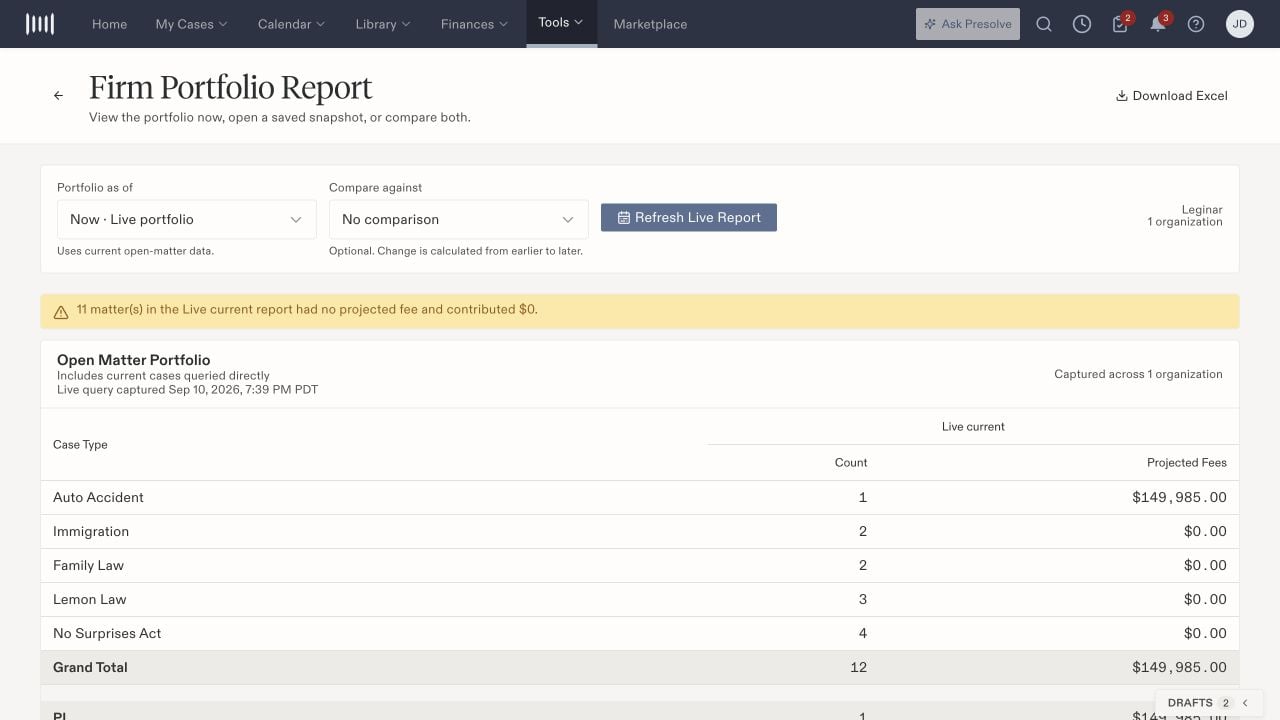
Firm Portfolio Report with Portfolio as of, Compare against, Refresh Live Report, and case-type counts and projected fees.

The Leginar demonstration organization's portfolio, with live/snapshot selection and missing-fee notice.

Compare two points in time

Choose an earlier or later snapshot under Compare against, then select Compare Portfolios. Read the earlier, later, and Change columns together. The page calculates change from earlier to later, regardless of the order in which you selected the dates. Review individual case-type rows before using Grand Total, PI, or Non-PI summaries. Changes can reflect both the set of open matters and the projected-fee values recorded on those matters.

Interpret missing projected fees

The report flags matters with no projected fee and counts their contribution as zero. A zero contribution therefore does not necessarily mean the matter has no expected fee. Review the missing-fee notice and the underlying case information with the responsible staff member. Projected fees describe recorded projections. Use accounting receipts and individual disbursements for payment progress.

Refresh or export

Use Refresh Live Report for current data. Select Download Excel after the report loads, then open the downloaded file and confirm the selected dates, organization scope, and totals before sharing it. Choosing a historical snapshot does not update it to today’s values. For a custom report with different fields or filters, use the report builder.