Open the case’s Lemon Law tab and select Engagement. Expand Phase 0.5 — Engagement and Document Collection if necessary.

Review the three status selectors

Choose the value that describes the current work. Verify a retainer’s signature state in the e-sign record before describing it as signed. Review the authorization documents before recording Partial or Signed, and review the chronology before marking it Complete.
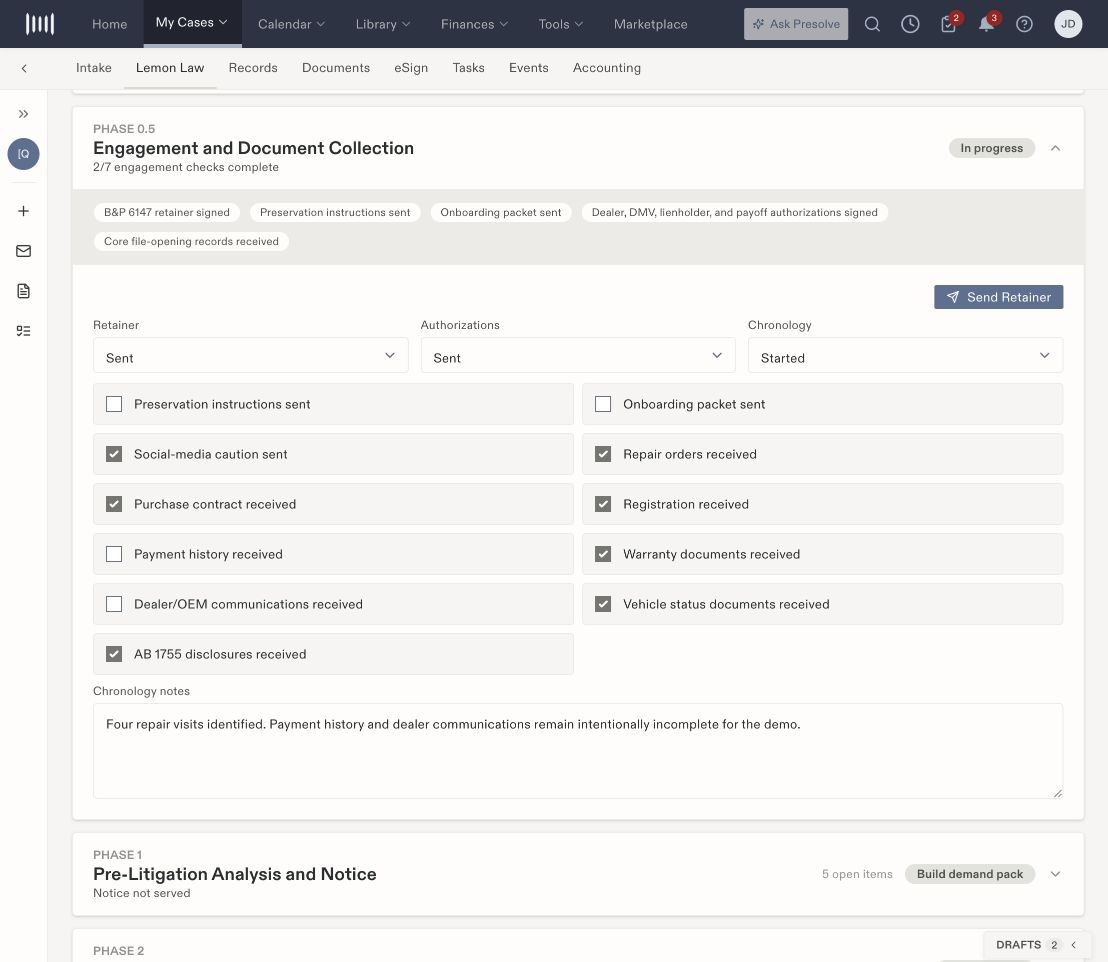
Engagement status selectors and a partially completed document collection checklist.

An in-progress demonstration with Sent retainers and authorizations and a Started chronology.

Review the document checklist

The checklist includes preservation instructions, an onboarding packet, social-media caution, repair orders, purchase contract, registration, payment history, warranty documents, dealer/OEM communications, vehicle-status documents, and disclosures. For each applicable item:
  1. Find the supporting file or communication in the matter.
  2. Check that it is the intended version and relates to this client and vehicle.
  3. Update the corresponding checkbox according to the work actually completed.
  4. Use Chronology notes to explain relevant gaps or follow-up.
  5. Save the workspace changes and reopen the phase to verify the values.
A checkbox records a status. It does not send instructions, request files, or upload a document. Use Documents and Records for those underlying activities.

Use the retainer action deliberately

Send Retainer is a separate action from the Retainer selector. Inspect the selected document, recipient, and sending details before completing that flow. A status of Sent does not establish a completed signature. Converted means the client signed a retainer. Changing the Engagement Retainer selector to Signed does not by itself convert the lead. Verify the completed signature and signing/handoff result, or use the lead-stage confirmation for a retainer signed outside Presolve.

Turn gaps into assigned work

If payment history or another needed item is missing, create a task with an owner and due date. Keep the checklist and task current as the supporting material arrives. An explanatory note alone does not create an assigned follow-up. Related: Lemon-law phase overview, case activity, and document organization.